

Instagram now lets you add music to your notes: heres how to do it
Instagram regularly adds new features and is known to experiment quite a bit. Its latest experiment is the ability to add music to Notes. For those unaware, Instagram lets you add text status updates that appear in a separate tab in your DM inbox. The new feature is an addition to Notes as you can now add music to it.
Instagram Notes gets music option
This feature essentially lets you add a 30-second snippet of any song available in Instagram’s library. You can also choose the part of the song that you want to appear in the note. Your Instagram Note with the song snippet will appear in your followers’ DM inbox and they can tap on it to listen to it. Just like the text notes, the song snippets are also ephemeral as they remain only for 24 hours.
How to add song snippets in your Instagram Note
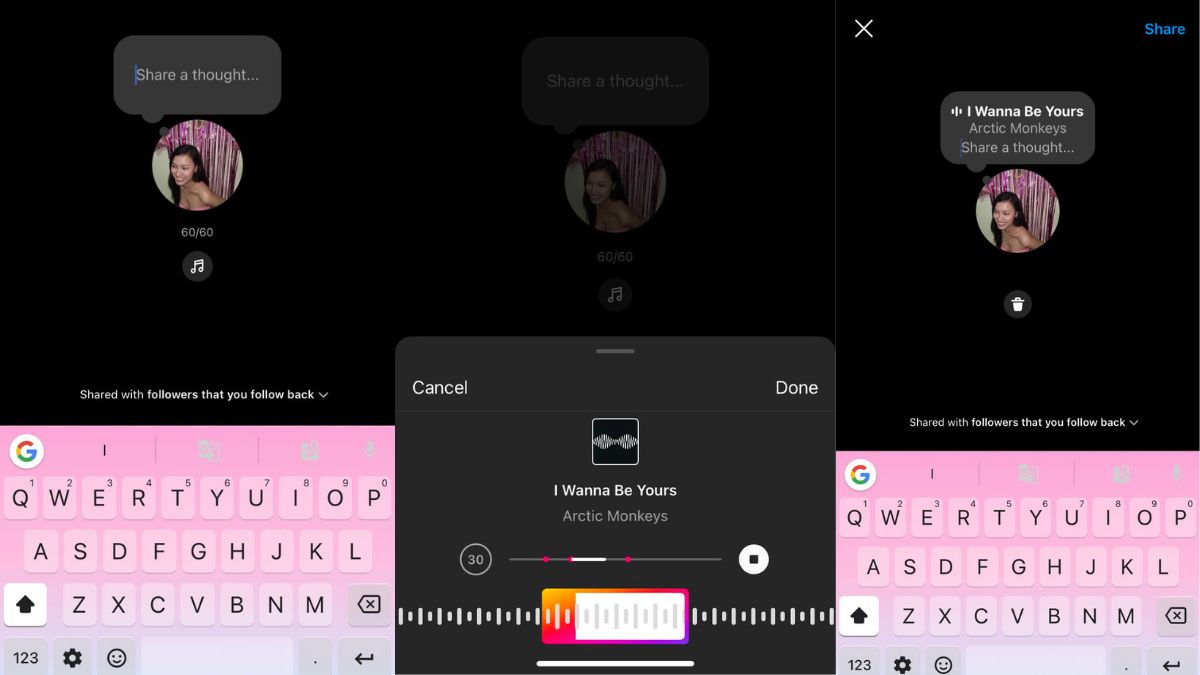
- Open Instagram and go to your DMs.
- Here, you’ll see your profile picture on top with a plus (+) icon.
- Tap on this icon and select the music button.
- Choose the song you want from what’s available in the library.
- Then select the part of the song you want to share as your status update.
- You can also choose to either share with your followers or with your close friends list.
- You can tap on the note to play the song that you’ve added. Also, others can reply to your note.



Meta CEO Mark Zuckerberg had announced this feature through the company’s Instagram channel. It isn’t a major update but if you’re interested in sharing text status updates like the 2000s, you might just like the addition of music as well. You can also continue sharing text updates to your notes, and these have a 60-character limit.
The post Instagram now lets you add music to your notes: here’s how to do it first appeared on 91mobiles.com.
from 91mobiles.com https://ift.tt/dCumFXG
>


No comments